Which camera for Photo Booth use?
For Photo Booth use, the Canon EOS R100 is currently one of the best all-round cameras for photo booth use. It offers excellent image quality and fast Dual Pixel CMOS autofocus, making it practical to use autofocus in live view for both still and video booth modes.
The R100 is compact, lightweight, and part of Canon;s modern RF mirrorless system, making it easy to mount in booths while supporting a wide range of lenses via RF or EF adapters. Overall, it provides an excellent balance of performance, reliability, and value for most photo booth setups.
Supported Canon Models
Remote Pro supports the following Canon Cameras:
Camera Model |
Supported |
|---|---|
Canon EOS R100 |
yes |
Canon EOS R50v |
yes |
Canon EOS R50 |
yes |
Canon EOS R10 |
yes |
Canon EOS R8 |
yes |
Canon EOS R7 |
yes |
Canon EOS R5 Mark II |
yes |
Canon EOS R5 |
yes |
Canon EOS R6 Mark III |
yes |
Canon EOS R6 Mark II |
yes |
Canon EOS R6 |
yes |
Canon EOS R |
yes |
Canon EOS RP |
yes |
Canon EOS-1DX Mark II |
yes |
Canon EOS-1DC |
yes |
Canon EOS-1DX |
yes |
Canon EOS-1Ds Mark III |
yes |
Canon EOS-1Ds Mark II |
no |
Canon EOS-1Ds |
no |
Canon EOS-1D Mark IV |
yes |
Canon EOS-1D Mark III |
yes |
Canon EOS-1D Mark IIN |
no |
Canon EOS-1D Mark II |
no |
Canon EOS-1D |
no |
Canon EOS 5DS R |
yes |
Canon EOS 5DS |
yes |
Canon EOS 5D Mark IV |
yes |
Canon EOS 5D Mark III |
yes |
Canon EOS 5D Mark II |
yes |
Canon EOS 5D |
no |
Canon EOS 6D Mark II |
yes |
Canon EOS 6D |
yes |
Canon EOS 7D Mark II |
yes |
Canon EOS 7D |
yes |
Canon EOS 90D |
yes |
Canon EOS 80D |
yes |
Canon EOS 77D/EOS 9000D |
yes |
Canon EOS 70D |
yes |
Canon EOS 60D |
yes |
Canon EOS 50D |
yes |
Canon EOS 40D |
yes |
Canon EOS 30D |
no |
Canon EOS 20D |
no |
Canon EOS 10D |
no |
Canon EOS 4000D/EOS 3000D/Rebel T100 |
yes |
Canon EOS 2000D/EOS 1500D/Rebel T7/Kiss X90 |
yes |
Canon EOS 1300D/Rebel T6/Kiss X80 |
yes |
Canon EOS 1200D/Rebel T5/Kiss X70 |
yes |
Canon EOS 1100D/Rebel T3/Kiss X50 |
yes |
Canon EOS 1000D/Rebel XS/Kiss F |
yes |
Canon EOS 250D/Rebel SL3/Kiss X10/200D Mark II |
yes |
Canon EOS 200D/Rebel SL2/Kiss X9 |
yes |
Canon EOS 100D/Rebel SL1/Kiss X7 |
yes |
Canon EOS 850D/Rebel T8i/Kiss X10i |
yes |
Canon EOS 800D/Rebel T7i/Kiss X9i |
yes |
Canon EOS 760D/Rebel T6s/EOS 8000D |
yes |
Canon EOS 750D/Rebel T6i/Kiss X8i |
yes |
Canon EOS 700D/Rebel T5i/Kiss X7i |
yes |
Canon EOS 650D/Rebel T4i/Kiss X6i |
yes |
Canon EOS 600D/Rebel T3i/Kiss X5 |
yes |
Canon EOS 550D/Rebel T2i/Kiss X4 |
yes |
Canon EOS 500D/Rebel T1i/Kiss X3 |
yes |
Canon EOS 450D/Rebel XSi/Kiss X2 |
yes |
Canon EOS 400D/Rebel XTi/Kiss X |
yes |
Canon EOS 350D/Rebel XT/Kiss N |
no |
Canon EOS 300D/Rebel/Kiss Digital |
no |
Canon EOS M6 Mark II |
yes |
Canon EOS M200 |
yes |
Canon EOS M50 Mark II/Kiss M2 |
yes |
Canon EOS M50/Kiss M |
yes |
Canon PowerShot SX70 HS |
yes |
Canon PowerShot G5 X Mark II |
yes |
Canon PowerShot G7 X Mark III |
yes |
Wireless Tethering (WiFi operation)
Remote Pro can wirelessly control recent cameras including the Canon EOS R series cameras, Canon EOS M6 Mark II, Canon EOS 90D, Canon EOS 80D, Canon EOS 77D, Canon EOS 70D, Canon EOS 6D Mark II, Canon EOS 6D, Canon EOS 800D/Rebel T7i, Canon EOS 200D/Rebel SL2 and mid to high end Canon DSLRs with the appropriate Canon WFT Wireless File Transmitter.
Before running Remote Pro the connection between the camera and computer needs to be setup by using the wireless settings on the camera and by running Canon's EOS Utility Launcher software (which can be downloaded from Canon's website with their EOS Utility software). Click on the "Pairing over WiFi/LAN" button and then select wifi connection on the camera and "Remote control (EOS Utility)" on the camera to establish the connection between the camera and computer. Please see the camera instruction manual for more information on how to setup the connection.
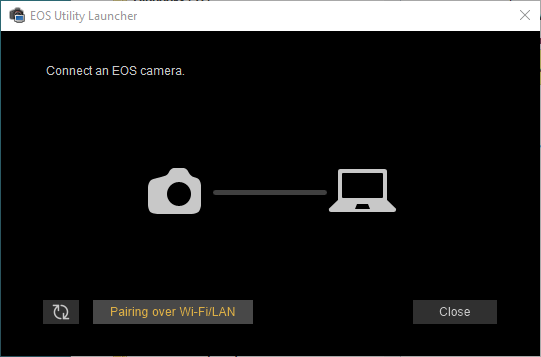
Older Canon cameras which come with a software CD may require Canon's WFT Pairing Utility to be run on the PC to setup the connection.
Once the camera and PC have been paired successfully Remote Pro will connect to the camera just like a normal wired USB connection. Please make sure no other software (e.g. Canon's EOS Utility) is running as this may prevent Remote Pro from connecting to the camera.
In operation the wireless connection should work just the same as a normal wired USB connection and give full access to the camera's controls, live view etc. The wireless connection may be slower than a USB connection, particularly as the distance between the camera and computer or wireless access point increases.
Please note: It is not possible to connect to the Canon EOS 1300D/Rebel T6, Canon EOS 750D/Rebel T6i or Canon EOS 760D/Rebel T6s wirelessly from a PC. These camera models can only be controlled wirelessly from a smart phone or tablet.
Older cameras with WiFi built-in to the camera may not support video capture when connected via wifi or LAN.