Breeze Remote Pro supports payments using standard cashless payment systems such as NAYAX contactless credit card readers to offer Pay to Start photo booths.
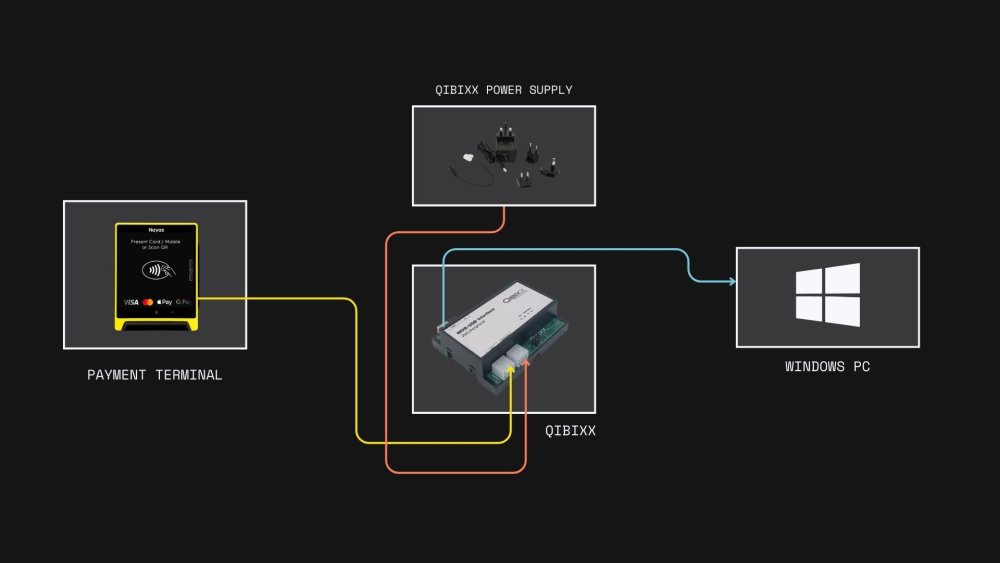
To use payment systems with Remote Pro you will need to run the free Breeze MDB Payment Utility and purchase the required hardware, including a QIBIXX MDB-USB Interface, power supply, cables, and a compatible MDB payment device such as the NAYAX VPOS Touch.
The MDB Payment Utility works alongside Remote Pro and monitors the state of the photo booth by reading the pathname of the screen currently being displayed. It then communicates with the payment system via the QIBIXX MDB-USB interface to request and authorize payments.
Getting Started
Please see our example events and tutorials on our MDB User Guide.
•Pay to Start with Photo Upsell •Free to Use with Pay on Print •Data Capture without a Touch Screen
MDB (Multi-Drop Bus) is a standard interface widely used in the vending machine industry to connect payment systems to machines. In this case it allows a payment terminal to be connected to a photo booth running Remote Pro.
Alternative Payment Systems
BKSoft in Germany have developed a photo booth cash payment system and associated hardware that works with Remote Pro. Please visit their website for more information. |